


Page 26 - IJOCTA-15-2
P. 26
A MILP model for one dimensional cutting stock problem with adjustable leftover threshold . . .
                                                              Table 7. Solution by 1D Solution in matrix form


                                                                    O 1 O 2 O 3 O 4 O 5 O 6 O 7 O 8 O 9
                                                               B 1
                                                               B 2       ✓        ✓                  ✓
                                                               B 3           ✓         ✓   ✓
                                                               B 4  ✓                                    ✓
                                                               B 5                              ✓
                                                               B 6
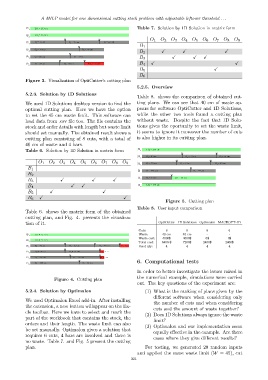
            Figure 3. Visualization of OptiCutter’s cutting plan
                                                              5.2.5. Overview
            5.2.3. Solution by 1D Solutions
                                                              Table 8. shows the comparison of obtained cut-
            We used 1D Solutions desktop version to find the  ting plans. We can see that 40 cm of waste ap-
            optimal cutting plan. Here we have the option     pears for software OptiCutter and 1D Solutions,
            to set the 45 cm waste limit. This software can   while the other two tools found a cutting plan
            load data from .csv file too. The file contains the  without waste. Despite the fact that 1D Solu-
            stock and order details with length but waste limit  tions gives the oportunity to set the waste limit,
            should set manually. The obtained result shows a  it seems to ignore it moreover the number of cuts
            cutting plan consisting of 8 cuts, with a total of  is also higher in its cutting plan.
            40 cm of waste and 4 bars.
            Table 6. Solution by 1D Solution in matrix form


                  O 1 O 2 O 3 O 4 O 5 O 6 O 7 O 8 O 9
             B 1
             B 2
             B 3            ✓             ✓        ✓
             B 4                 ✓   ✓
             B 5       ✓                       ✓
             B 6  ✓                                     ✓
                                                                           Figure 5. Cutting plan
                                                              Table 8. User input comparison
            Table 6. shows the matrix form of the obtained
            cutting plan, and Fig. 4. presents the visualiza-
            tion of it.                                                OptiCutter 1D Solutions Optimalon MACROPT-1D
                                                               Cuts:       6        8        6         6
                                                               Waste:    40 cm    40 cm      -         -
                                                               Waste cost:  4000$  4000$    0$        0$
                                                               Total cost:  6400 $  7200$  2400$     2400$
                                                               Used qty:   4        4        4         4


                                                              6. Computational tests

                                                              In order to better investigate the issues raised in
                                                              the numerical example, simulations were carried
                         Figure 4. Cutting plan
                                                              out. The key questions of the experiment are:
            5.2.4. Solution by Optimalon                         (1) What is the ranking of plans given by the
                                                                     different software when considering only
            We used Optimalon Excel add-in. After installing
                                                                     the number of cuts and when considering
            the extension, a new button willappear on the Ex-
                                                                     cuts and the amount of waste together?
            cle toolbar. Here we have to select and mark the
                                                                 (2) Does 1D Solutions always ignore the waste
            part of the workbook that contains the stock, the
                                                                     limit?
            orders and their length. The waste limit can also
                                                                 (3) Optimalon and our implementation seem
            be set manually. Optimalon gives a solution that
                                                                     equally effective in the example. Are there
            requires 6 cuts, 4 bars are involved and there is
                                                                     cases where they give different results?
            no waste. Table 7. and Fig. 5 present the cutting
            plan.                                                 For testing, we generated 20 random inputs
                                                              and applied the same waste limit (W = 45), cut
                                                           221

