


Page 62 - DP-2-2
P. 62
Design+                                                               Da Vinci AI Tutor in art history learning


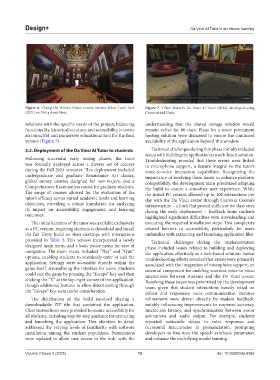
            Figure  6.  Chung the Artist’s  Palace Louvre Interior-Salon Carré Pack   Figure  7.  Tiffani  Barner’s  Da  Vinci  AI  Tutor  (2024),  developed  using
            (2021) on Unity Asset Store                        Convo.ai and Unity

            solutions with the specific needs of the project, balancing   understanding  that  the  shared  storage  solution  would
            functionality, historical accuracy, and accessibility to create   remain active for 60  days. Plans for a more permanent
            an impactful and immersive educational tool for the final   hosting solution were discussed to ensure the continued
            version (Figure 7).                                availability of the application beyond this window.
            3.2. Deployment of the Da Vinci AI Tutor to students  Technical challenges during this phase initially included
                                                               issues with building the application as a web-based solution.
            Following successful early testing phases, the tutor   Troubleshooting revealed that these errors were linked
            was formally deployed across a diverse set of courses   to microphone support, a feature integral to the tutor’s
            during the Fall 2024 semester. This deployment included   voice-to-voice interaction capabilities. Recognizing the
            undergraduate and graduate Renaissance Art classes,   importance of resolving these issues to enhance platform
            global survey courses designed for non-majors, and a   compatibility, the development team prioritized adapting
            Comprehensive Examination course for graduate students.   the build to ensure a smoother user experience. While
            The  range  of  courses  allowed  for  the  evaluation  of  the   the initial PC version allowed up to 100 interactions per
            tutor’s efficacy across varied academic levels and learning   day with the Da Vinci avatar through Convo.ai Convai’s
            objectives, providing a robust foundation for analyzing   infrastructure – a limit that proved sufficient for class sizes
            its impact on accessibility, engagement, and learning   during the early deployment – feedback from students
            outcomes.                                          highlighted significant difficulties with downloading and
              The initial iteration of the tutor was available exclusively   executing the required installation steps. This complexity
            as a PC version, requiring students to download and install   created  barriers to accessibility,  particularly for  users
            the full Unity build on their desktops with instructions   unfamiliar with extracting and launching application files.
            provided in  Table  3. This version incorporated a newly   Technical challenges during the implementation
            designed main menu and a basic pause menu for ease of   phase included issues related to building and deploying
            navigation.  The  main  menu  included  “Play”  and  “Quit”   the application effectively as a web-based solution. Initial
            options, enabling students to seamlessly enter or exit the   troubleshooting efforts revealed that errors were primarily
            application. Settings were accessible directly within the   associated with the integration of microphone support, an
            game itself, streamlining the interface for users. Students   essential component for enabling seamless voice-to-voice
            could exit the game by pressing the “Escape” key and then   interactions between students and the Da Vinci avatar.
            clicking the “X” at the top-right corner of the application,   Resolving these issues was prioritized by the development
            though additional features to allow direct exiting through   team,  given  that  student  interactions  heavily  relied  on
            the “Escape” key were under consideration.         robust and responsive voice communication. Iterative

              The distribution of the build involved sharing a   refinements were  driven  directly  by student feedback,
            downloadable ZIP file that contained the application.   notably influencing improvements to response accuracy,
            Clear instructions were provided to ensure accessibility for   interaction latency, and synchronization between avatar
            all students, including step-by-step guidance for extracting   animations and audio output. For example, students
            and launching the application. This attention to detail   reported noticeable delays in  voice  responses  and
            addressed the varying levels of familiarity with software   occasional inaccuracies  in  pronunciation,  prompting
            installation among the student population. Permissions   developers to fine-tune the speech synthesis parameters
            were updated to allow easy access to the link, with the   and enhance the underlying model training.


            Volume 2 Issue 2 (2025)                         12                               doi: 10.36922/dp.8365

