


Page 85 - ESAM-1-4
P. 85
Engineering Science in
            Additive Manufacturing                                                TwinPrint: Dual-arm robotic bioprinting


            saved z-height separately without readjusting the XY home   a predictive machine learning model was developed as a
            values. The arm travel speed can be adjusted using the axes   software add-on to suggest optimal flow rates to the user
            buttons, but this does not affect the 3D bioprinting velocity   for the 3D bioprinting materials selected. This is detailed in
            previously specified in the parsed G-code.         another study.  Moreover, to enhance user experience and
                                                                          38
              Analogs to the arms, to determine which Pump     ease the printing process involving several components,
            settings box corresponds to its respective pump set, only   the side buttons offer device control both collectively and
            one pump from each of the two sets can be initialized via   individually.
            the “Initialize” button. As shown in Figure 4B, Pump 1 is   Finally, the “Printing Status monitoring” tab, as shown
            the master pump while Pumps 2–4 are arranged according   in Figure 3D, allows users to monitor the different printing
            to their position from the master. Since a total of eight   and pumping activities occurring across all devices
            pumps can be connected to the TwinPrint GUI, a labeling   collectively in a single tab, making it easier to quickly
            feature is incorporated for easy reference to each pump   discern any failure.
            and its corresponding material type. This new name is
            then published across all tabs. Figure 4B shows the label of   3.2. Print accuracy test
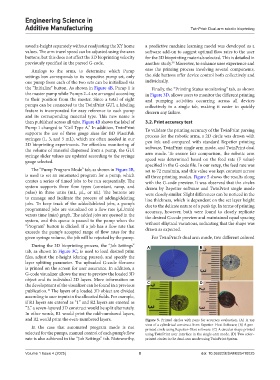
            Pump 1 changed to “Cell Type A.” In addition, TwinPrint   To validate the printing accuracy of the TwinPrint parsing
            supports the use of three gauge sizes for BD PlastiPak   process for the robotic arms, a 2D circle was drawn with
            syringes (1, 3, and 5 mL), which are often needed in our
            3D bioprinting experiments. For effortless monitoring of   pen ink and compared with standard Repetier printing
            the volume of material dispensed from a pump, the GUI   software, TwinPrint single arm mode, and TwinPrint dual
                                                               arm mode. To ensure fair comparison, the robotic arm
            syringe slider values are updated according to the syringe
            gauge selected.                                    speed was determined based on the feed rate (F value)
                                                               specified in the G-code file. In our setup, the feed rate was
              The “Pump Program Mode” tab, as shown in Figure 3B,   set to 72 mm/min, and this value was kept constant across
            is used to set an automated program for a pump, which   all three printing modes. Figure 5 shows the results along
            creates a series of timed jobs to be run sequentially. The   with the G-code preview. It was observed that the circles
            system supports three flow types (constant, ramp, and   drawn by Repetier software and TwinPrint single mode
            pulse) in three units (mL,  µL, or nL). The buttons are   were closely similar. Slight differences can be noticed in the
            to manage and facilitate the process of adding/deleting   line thickness, which is dependent on the set layer height
            jobs. To keep track of the added/deleted jobs, a pump’s   due to the delicate nature of a pen’s tip. In terms of printing
            programmed jobs are visualized on a flow rate (µL/min)   accuracy, however, both were found to closely replicate
            versus time (min) graph. The added jobs are queued in the   the desired G-code preview and maintained equal spacing
            system, and this queue is passed to the pump when the   without elliptical variations, indicating that the shape was
            “Program” button is clicked. If a job has a flow rate that   drawn as expected.
            exceeds the pump’s accepted range of flow rates for the
            given syringe volume, the job will be rejected by the pump.  For TwinPrint’s dual arm mode, two different colored
              During the 3D bioprinting process, the “Job Settings”   A               B
            tab, as shown in Figure 3C, is used to load desired print
            files, adjust the z-height (during pauses), and specify the
            layer  splitting parameter.  The uploaded  G-code filename
            is printed on the screen for user assurance. In addition, a
            G-code visualizer allows the user to preview the loaded 3D
            object and its individual 2D layers. More information on
            the development of the visualizer can be found in a previous   C          D
                     10
            publication.  The layers of a loaded 3D object are divided
            according to user inputs in the allocated fields. For example,
            if R1 layers are entered as “1” and R2 layers are entered as
            “2,” a seven-layered 3D construct would be split alternately.
            In other words, R1 would print the odd-numbered layers,
            and R2 would print the even-numbered layers.       Figure 5. Printed circles with pens for accuracy evaluation. (A) A top
              In the case that automated program mode is not   view of a cylindrical construct from Repetier–Host Software; (B) A pen-
                                                               printed circle using Repetier–Host software. (C) A circular shape printed
            selected for the pumps, manual control of each pump’s flow   using TwinPrint user interface in the single-arm mode. (D) Two color–
            rate is also achieved in the “Job Settings” tab. Noteworthy,   printed circles in the dual-arm mode using TwinPrint System.


            Volume 1 Issue 4 (2025)                         8                          doi: 10.36922/ESAM025410025

